


Hey Player: a hands-free Jellyfin remote that answers in 2.6 seconds
I wanted one sentence to be enough. From across the room: “Hey Player, play dark techno.” No keyboard, no phone, no hotkey. Music would start locally from the Jellyfin server on my LAN, and a spoken confirmation would come back quickly enough to feel like the machine had been waiting for me.
AI models discussed: OpenCode’s Big Pickle LLM
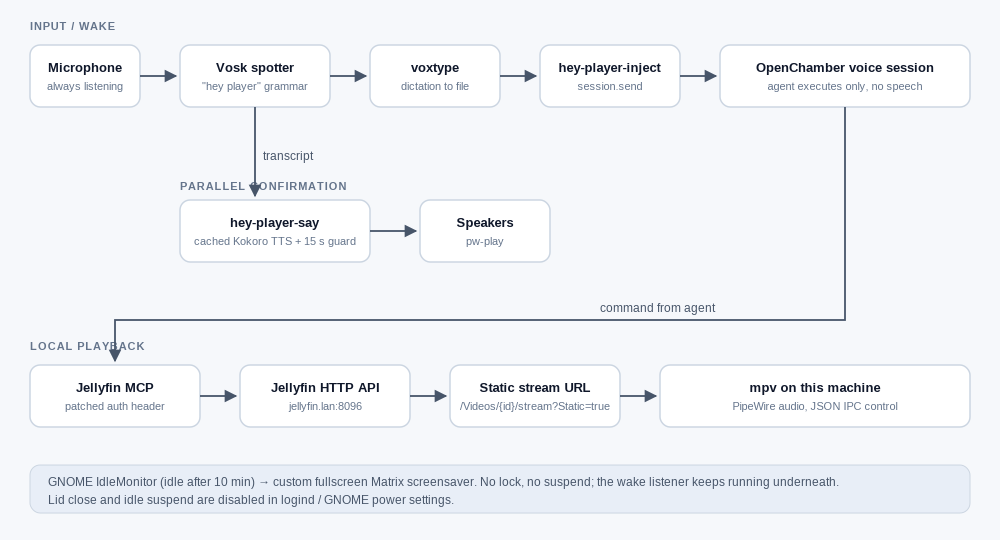
The result is a small pile of scripts on a GNOME/Wayland laptop. A wake-word spotter listens all the time. A dictation model transcribes the command. An agent in a dedicated OpenChamber session does the work. A separate text-to-speech path answers first. The measured fast path is 2.62 seconds to the start of the spoken confirmation and 2.89 seconds to command injection — the answer arrives before the agent is finished.
The one design decision that mattered
After the transcript exists, the flow splits in two:
- Execution — inject the transcript into the voice session. The agent resolves aliases, calls the Jellyfin helpers, and drives mpv.
- Confirmation — map the transcript to one of a handful of canonical sentences and speak it from a cached audio file, without waiting for the agent.
That split is the whole trick. My first version asked the agent to speak its own reply. It worked, but the reply landed after the model had thought, called tools, and written text. It felt slow, and a stale agent-side TTS call sometimes produced a duplicate confirmation. The new contract is blunt: the listener speaks; the agent acts and replies in chat. A 15-second duplicate guard catches anything that slips through.
Jellyfin fought back a little
The server was a Jellyfin 12.4.0 instance on the LAN. Credentials stayed in a private env file and were read at runtime; nothing secret went into a script, a config file, or this post.
Two API surprises cost me an evening:
- A trailing slash in
JELLYFIN_URLproduced404responses. Normalize withrstrip("/")before building any URL. X-Emby-Tokenreturned401. This server wantedAuthorization: MediaBrowser Token="...", with client and device metadata attached:
headers = {
    "Authorization": (
        f'MediaBrowser Token="{api_key}", '
        'Client="JellyfinMCP", Device="OpenCode", '
        'DeviceId="opencode-jellyfin-mcp", Version="1.0"'
    )
}
That required a two-file patch to the cloned jellyfin-mcp checkout: the HTTP
service and the websocket service. The patch is included in the archive.
One more quirk: the library contained no Audio items at all. The music lived
in MusicVideo items, so the resolver accepts both types and builds static
stream URLs like:
http://jellyfin.lan:8096/Videos/{id}/stream?Static=true
Album, artist, playlist, and folder IDs are expanded into their playable children before playback starts.
Local playback is mpv plus a socket
jellyfin-play-local resolves search text, item IDs, albums, playlists, or
folders through the Jellyfin API and launches mpv with the resulting URLs. The
defaults are deliberately boring: volume 100, audio only, no shuffle, no loop.
| Flag | Behavior |
|---|---|
| (default) | volume 100, --no-video, no shuffle, no loop |
--video |
show video for MusicVideo items |
--volume N |
initial volume |
--shuffle |
randomize resolved items |
--loop |
--loop-playlist=inf |
--pause, --ao, --limit, --dry-run |
start paused, choose output, cap results, resolve only |
A second helper, jellyfin-mpv-control, talks to mpv over a JSON IPC socket at
/tmp/opencode-jellyfin-mpv.sock:
jellyfin-mpv-control <pause|play|toggle|stop|next|prev|volume N|seek N|status|quit>
Audio goes through PipeWire. I verified playback, pause/resume, track skipping, volume changes, and stop end to end. The alias table used by the agent stayed small and human-readable: “dark techno,” “epic,” “soft,” and “synth” mapped to four library folders, with no raw item IDs needed in spoken commands.
The wake word and the transcript
hey-player-listener is a long-running user service. It captures 16 kHz mono
audio from PipeWire with pw-record in 125 ms chunks and feeds a Vosk grammar
recognizer using the small English US model. The grammar contains only the wake
variants — “hey player,” “hay player,” “hey players,” “hey play er” — plus an
unknown token. That keeps the always-on recognizer cheap.
The snappy feeling comes from partial-result detection. As soon as recognizer output starts with “hey play,” the listener treats it as a wake and starts recording the command. After a wake: an 8-second cooldown, a 6-second recording window, and a 15-second transcript timeout.
Dictation is handled by voxtype with the base.en Whisper model. Its hotkey is
disabled; the listener starts and stops recording externally and reads the
transcript from a file. The timing knobs that mattered were a 1.5-second
silence timeout and a -12 dBFS speech threshold.
One detail is worth calling out because the example config is misleading. The
bundled voxtype-config.toml shows a fixed output.file_path of
/run/user/1000/hey-player/command.txt. That file is an example/default. The
running listener is authoritative: for each wake it creates a unique path under
$XDG_RUNTIME_DIR/hey-player/, unlinks any stale file, passes that path with
voxtype record start --file=..., and polls it for the transcript. If you adapt
this build, follow the listener.
Speaking before the agent finishes
hey-player-say calls OpenChamber’s local text-to-speech endpoint with the
kokoro-en-v0_19 model and plays the returned audio through pw-play. The
cache lives under ~/.cache/hey-player/tts; its key includes the text, speaker,
and speed, so the common confirmations are effectively prewarmed.
The listener maps a transcript to a canonical sentence before it injects anything:
| Heard | Spoken confirmation |
|---|---|
| pause / stop | “Pausing the music.” / “Stopping the music.” |
| next / skip | “Playing the next track.” |
| previous / back | “Playing the previous track.” |
| dark techno | “Playing dark techno music from Jellyfin.” |
| volume 40 | “Setting volume to 40 percent.” |
Unknown commands get “Sorry, I didn’t catch a playable command.” rather than silence. The spoken answer is deliberately narrow; the agent is still free to interpret the full transcript.
Measured after the wake:
| Event | Time after wake |
|---|---|
| Confirmation starts | 2.62 s |
| Command injected | 2.89 s |
Getting the words into the session
hey-player-inject sends a session.send action to the local OpenChamber
agent-tool endpoint. The session ID lives in a private file; the archive only
contains a placeholder. The payload looks like this:
{
  "input": {
    "action": "session.send",
    "sessionId": "ses_REPLACE_WITH_YOUR_SESSION_ID",
    "prompt": "Hey Player: play dark techno"
  },
  "sessionID": "ses_REPLACE_WITH_YOUR_SESSION_ID",
  "callID": "hey-player-<timestamp>",
  "tool": "openchamber"
}
The injector first tries to discover the endpoint and token from the running
OpenChamber process environment, then falls back to a private env file. I also
kept a manual fallback: Super+Alt+V runs hey-player-manual, records one
command, and injects it through the same path.
I did try opencode run for injection. It failed with a free-usage-limit error,
so the session tool is the supported route here.
Keeping the laptop available
An always-listening remote is useless if the laptop suspends or locks. The final settings are intentionally aggressive:
| Setting | Value |
|---|---|
org.gnome.desktop.session idle-delay |
0 (GNOME never blanks) |
org.gnome.desktop.screensaver lock-enabled |
false |
org.gnome.desktop.screensaver ubuntu-lock-on-suspend |
false |
sleep-inactive-ac-type |
'nothing' |
sleep-inactive-battery-type |
'nothing' |
| lid switches (all states) | ignore via a persistent logind drop-in |
Closing the lid does nothing on AC, battery, or docked. The microphone listener keeps running unattended. The obvious trade-off is battery drain if the machine is left off the charger, so this is a desk-and-couch setup, not a travel setup.
A screensaver that isn’t a screensaver
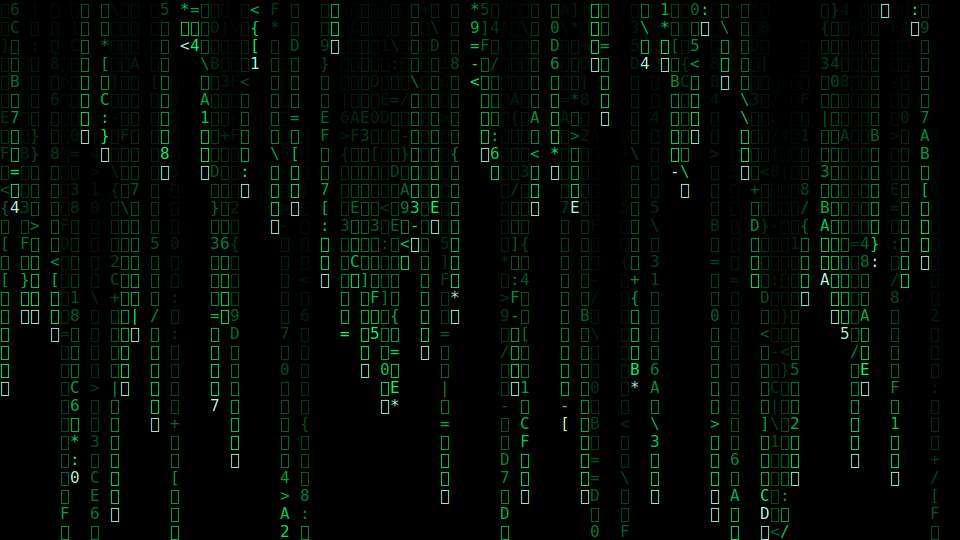
GNOME no longer has a real screensaver — it has a lock screen. Since locking was off the table, I wrote a small GTK3 Python program instead.
It reads idle time from Mutter’s org.gnome.Mutter.IdleMonitor D-Bus API. After
10 minutes it maps a fullscreen, undecorated window with a blank cursor. A Cairo
DrawingArea renders green and cyan falling katakana at about 30 fps. Any key,
click, pointer motion, or user-active transition hides it. A 2-second cooldown
prevents an immediate re-show if Mutter has not reset its idle clock yet, and
animation timers stop while hidden.
Two small headaches were worth remembering. GTK’s draw signal needs
PyGObject’s foreign Cairo bridge: install python3-gi-cairo and call
gi.require_foreign("cairo"), or you get a missing struct converter error.
And Wayland limits testing: GNOME Shell’s screenshot D-Bus API denied access
from the tool shell, and wtype reported no virtual keyboard protocol. I
verified the show/hide paths by driving the callbacks directly and rendering a
frame to a PNG.
Lessons worth stealing
- Normalize Jellyfin URLs before use; a trailing slash is a
404. - Try the
MediaBrowser Tokenauthorization header whenX-Emby-Tokenfails. - Music may be
MusicVideo, notAudio. Accept both. - mpv’s
--http-header-fieldssplits on commas, so keep its auth header minimal. - Let one component speak. Two TTS paths will eventually double-talk.
opencode runwas not usable for session injection; use the session tool.- Guard screensaver re-show with a cooldown, or idle-time races will flash it.
- On Wayland, test by invoking callbacks and rendering frames, not by faking input.
- Keep tokens, API keys, sudo, and session IDs in private secret flows. None appear in the archive.
The archive
I copied every working script, config snippet, the MCP patch, the architecture diagram, and the screensaver preview into a redacted archive:
Download hey-player-jellyfin-voice-screensaver.tar.gz
Paths are anonymized (~ or /home/user depending on whether a shell expands
them), the LAN address is jellyfin.lan, item IDs are placeholders, and secret
files are absent. To adapt it, put the scripts in ~/.local/bin/, point the
env-file paths at your own private config, create a real session-ID file, and
install the user services. The listener’s unique transcript file behavior is
the one to preserve.
Useful checks after installation:
systemctl --user status hey-player-listener.service hey-player-screensaver.service
gsettings get org.gnome.desktop.session idle-delay
gsettings get org.gnome.settings-daemon.plugins.power sleep-inactive-battery-type
hey-player-screensaver --demo
hey-player-screensaver --idle-ms=10000
What I would change next
This is a working rig, not a product. If I rebuilt it, I would move the canonical confirmation table into a small config file so new phrases do not require editing Python. I would also log a one-line timing trace for every wake — wake, transcript, confirmation, injection, play — into a rotating file, which would make regressions easier to spot than journal greps. The TTS cache should be prewarmed from the confirmation table at service start, so the first command after a reboot is as fast as the hundredth.
I would not put the LLM back into the confirmation path. The 2.6-second number is a consequence of removing it, and it is the part of the build I would defend unchanged. The agent is still useful: it resolves vague phrases, picks targets, and handles playback commands. It just does not have to be responsible for telling the room what happened.
Credits
| Project | Link |
|---|---|
| Jellyfin | https://jellyfin.org/ |
| jellyfin-mcp | https://github.com/sandraschi/jellyfin-mcp |
| voxtype | https://github.com/peteonrails/voxtype |
| Vosk | https://alphacephei.com/vosk/ |
| mpv JSON IPC | https://mpv.io/manual/master/#json-ipc |
| PipeWire | https://pipewire.org/ |
| OpenChamber | https://docs.openchamber.dev/ |
| OpenCode | https://opencode.ai/ |
| Kokoro TTS | https://github.com/hexgrad/kokoro |
Devin Flake read, verified, and implemented all the code before running and publishing.